Dashboard
The dashboard is the app's home screen (route /). It answers two questions:
what is running right now, and what is it costing? Everything else on the page
is in service of starting or stopping a server.
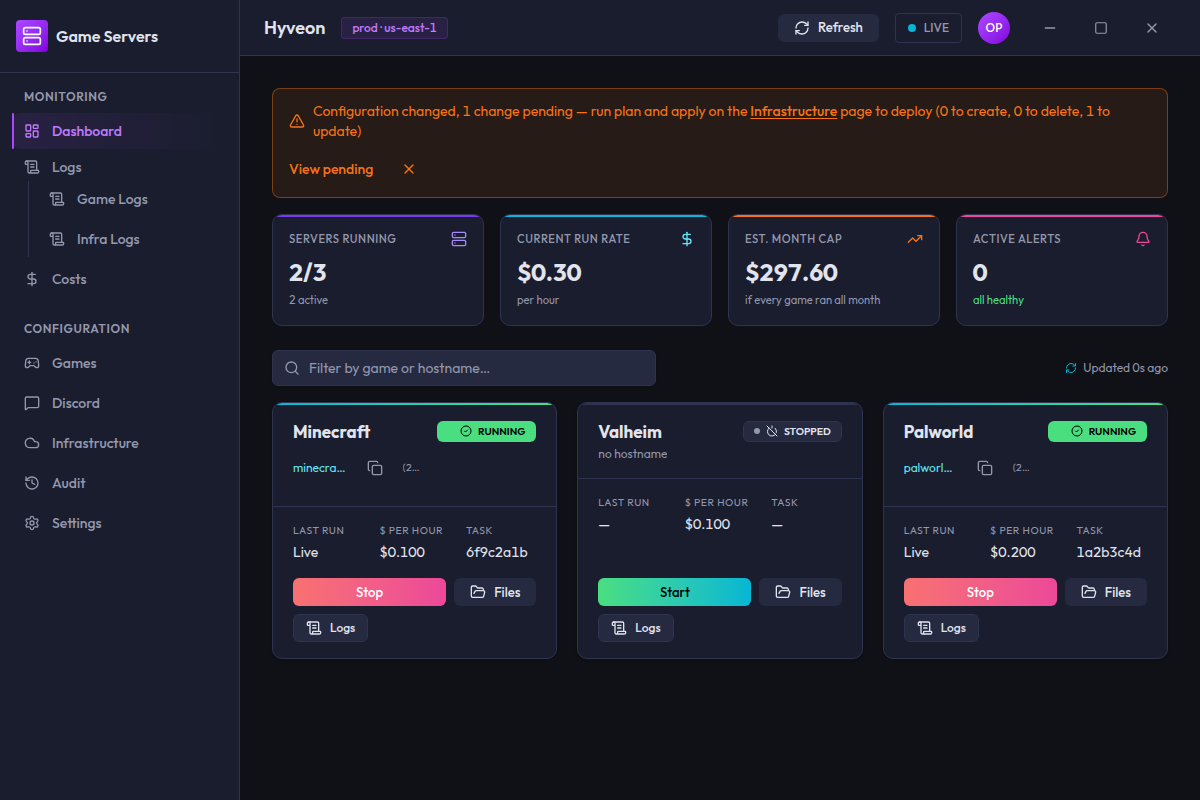
The KPI strip
Four tiles across the top. Each has a label, a large value, and a small delta line underneath.
| Tile | Value | Delta line |
|---|---|---|
| Servers running | 2/5 — running over total declared | all idle, or 2 active |
| Current run rate | Sum of $/hour estimates across currently-running games, e.g. $0.12 | per hour |
| Est. month cap | totalPerHourIfAllOn × 24 × days in the current month — what a full month would cost with every server running 24/7, e.g. $89.28 | if every game ran all month |
| Active alerts | Count of games in the error state | all healthy, or 3 need attention |
Both cost tiles are computed entirely from the free per-game Fargate estimate
(the costs.estimate IPC channel, already fetched for the game cards' $ per hour stat)
and the current run state — the app makes no AWS Cost Explorer API calls,
ever. There is no "no data" em-dash state for these tiles the way the old
actuals-driven tiles had, because there is no external call that can fail:
the underlying estimate is either available (from costs.estimate) or
defaults to $0.00.
Servers running shows an em-dash when no games are declared at all.
Active alerts always shows a real number, including 0.
For real dollars actually billed to your AWS account, see the Costs page's link-out to the AWS Cost Explorer console.
Game cards
One card per declared game. The grid is three columns on a wide window, two on a medium one, one on a narrow one.
Status badge
| Badge | Meaning |
|---|---|
| RUNNING | An ECS task is running and healthy |
| STARTING | RunTask has been issued; the task has not reached RUNNING yet |
| STOPPED | No task running. This is the normal resting state |
| NOT DEPLOYED | No infrastructure has been deployed yet — the Pulumi stack has no outputs. Run apply on the Infrastructure page |
| ERROR | The task or its status lookup failed |
Every state change is also announced to screen readers, e.g. "minecraft server is now running".
When a card is in the ERROR state and the backend supplied a reason, that
reason is shown as a short line of red text under the header, next to a
warning icon — e.g. Task failed to start: insufficient capacity. No reason
is shown if the backend didn't supply one.
Connect string
Under the game name the card shows the server's hostname (minecraft.example.com),
falling back to its raw public IP if DNS has not resolved yet, or the muted
text no hostname if neither is known.
When there is something to copy, a copy button sits next to it. Pressing it writes the displayed connection value (the hostname, or the public IP when there is no hostname) to your clipboard. There is no visible confirmation — no toast, no icon change — so if nothing seems to happen, the copy most likely worked. When both a hostname and a public IP are known, the IP is also shown on its own line below the hostname in parentheses; the button still copies the hostname.
Stat tiles
Three small tiles across the card:
| Label | Shows |
|---|---|
| Last run | Live while running, Booting while starting, — otherwise. Despite the label it is a state, not a timestamp |
| $ per hour | Estimated Fargate cost for this game's CPU/memory pair, e.g. $0.049. — if no estimate is available |
| Task | The first eight characters of the running task's ID, or — |
Start and Stop
The card shows exactly one of the two buttons:
| Game state | Button | Enabled |
|---|---|---|
STOPPED / NOT DEPLOYED | Start | Yes |
RUNNING / STARTING | Stop | Yes |
ERROR | Start | Yes — lets you retry starting the server without leaving the dashboard |
After pressing either button the card locks for three seconds, then re-fetches that one game's status and unlocks. The lock applies even if the call failed, so a transient error never leaves a card stuck.
Starting shows a toast: minecraft is starting. Failures show an error toast
with the underlying reason.
Every Start first takes a 120-second per-game start lease in the Discord DynamoDB table, shared with the Discord /server-start command, so a desktop Start and a Discord start can never launch two tasks for one game. While another start holds the lease, the error toast reads A start for {game} is already in progress. (with the game's name in place of {game}). The lease is not released when a start succeeds, so pressing Stop and then Start again within 120 seconds is refused with that same toast until the lease expires; a start that fails or finds the game already running releases it immediately. If the stack was applied before the lease table existed, Start fails with Infrastructure is out of date (no start-lease table). Run Apply on the IaC page first. Run Apply on the Infrastructure page, then retry.
Starting is refused while a file or folder upload into that game's volumes is in progress: the error toast reads An upload into 'minecraft' is in progress. Wait for it to finish or cancel it, then start the server. Start again once the upload ends or is cancelled. A download in progress does not block a start. This applies to the desktop app only; the Discord /server-start command does not see desktop uploads.
Two more buttons sit alongside:
- Files opens the game's in-app file browser and starts a browsing session for it.
- Logs jumps to the Logs page with this game pre-selected.
The stop confirmation
Pressing Stop opens a dialog:
Stop minecraft?
Active sessions will end.
[Cancel][Stop server]
There is a checkbox: Don't ask again for this session. Ticking it and confirming suppresses the dialog for the rest of the session — subsequent Stop presses act immediately.
Two things to know about that suppression:
- It is global, not per-game. Suppressing it on one card suppresses it for every card.
- It lives in memory for the lifetime of the app window. It survives moving between screens; it is cleared when you restart or reload the app.
Ticking the box and then pressing Cancel does nothing — the suppression is only recorded if you actually confirm.
The undo toast
Every successful stop produces a neutral toast reading minecraft stopped
with an Undo action, visible for five seconds. Pressing Undo issues a
start for the same game and schedules a status refresh. It appears whether the
stop went through the dialog or the suppressed fast path.
Files
Files on a game card navigates to that game's file browser page, /games/<name>/files, and asks it to start a session on arrival. There is no modal, external link, or one-time password any more: browsing, uploading, downloading, renaming and deleting all happen inside Hyveon.
What happens when you press it:
- If the game's session is stopped or has failed, the page launches a session immediately, so you do not need to press a second button.
- If a session is already starting or running, the page just shows it. Nothing is relaunched.
- If a previous session is still running from before (shown as orphaned), the page does not adopt it. It says so and waits for you to restart it from the page.
- If the game's volume has not been deployed yet, the page shows Nothing to browse yet and asks you to apply the infrastructure first.
The auto-start request is one-shot. The page clears it after acting, so pressing Back or reloading the page does not launch another session. Opening the page any other way (for example from the Files button on the game's detail screen) only shows the session's current state.
The session bar, volume picker, and file operations are documented with the rest of the game screens on the Games page. If you start a folder upload while a leftover session is running, the upload card says "A file manager session for this game is already running. Stop it, then the upload starts its own session." and offers Stop session and upload.
The pending-changes banner
When the declared game server configuration (deployment-config.json) has
changes that have not been applied to AWS, an orange banner appears at the top
of the dashboard:
Configuration changed, 3 changes pending — run plan and apply on the Infrastructure page to deploy (1 to create, 0 to delete, 2 to update) View pending
View pending links to the Games page. The banner is checked every 30 seconds.
How dismissal works
The × button dismisses the banner, but the dismissal is tied to the exact
set of pending changes, not to a simple "hide" flag. Concretely:
- Dismissing records a signature of the current drift report (which games, which kinds of change, which fields) in session storage.
- The banner stays hidden while the drift report matches that signature. This survives moving between screens.
- The banner comes back as soon as the pending set changes — a new game edited, one removed, different fields touched.
- If a Pulumi apply clears the drift entirely, the stored dismissal is wiped, so if the same change reappears later you are told about it again.
- Restarting or reloading the app clears the dismissal.
The banner is also hidden — rather than showing a broken state — if the drift check itself fails.
Filtering
A search box above the grid, placeholder Filter by game or hostname….
Matching is a case-insensitive substring against the game name or the
hostname (or the public IP, when there is no hostname), so typing part of an
address works.
Loading and empty states
| Situation | What you see |
|---|---|
| Before the first status poll returns | Loading servers… |
| No games declared or deployed | A card headed No games deployed, explaining that you declare a game on the Games page, then run a plan and apply from Infrastructure to create its ECS task definition, EFS volume, and CloudWatch log group — with links to the setup guide and to add a game |
| Filter matches nothing | No games match "abc". |
If the very first status poll fails (before any statuses have ever loaded), the grid shows a Couldn't load game status card with the underlying error message and a Retry button, instead of any game cards. This is distinct from No games deployed above — a failed fetch can't be mistaken for a deployment with nothing declared.
Polling
Game status is polled every 20 seconds, app-wide, and keeps running as you move between screens.
The indicator next to the filter box shows Updated 12s ago, spins while a
poll is in flight, and reveals next refresh in 8s on hover. If two whole
intervals pass without a successful poll it turns into a red
Stale · last updated … pill, which clears itself on the next success.
The Refresh button in the top bar forces every poller to run immediately.
The LIVE pill next to it summarises the same health across all pollers.
The top bar doubles as the app's window title bar — drag any empty area of it to move the window, and on Linux it shows in-app minimize/maximize/close buttons since the OS title bar is hidden.
Note that the underlying per-game cost estimates (costs.estimate) are
fetched once on mount, not part of that 20-second cycle — see
The KPI strip above. The Current run rate and
Est. month cap tiles still change every poll, though, since they're
recomputed from the current run state each time. The pending-changes banner
has its own separate cadence — see
The pending-changes banner above.